In-product AI expert for complex B2B software
Your best onboarding specialist, inside every screen.
Users ask. Sally shows them how, on paths you approve. No ticket. No screen-share.
You are paying people to re-teach a UI you already built.
- Onboarding calls
- Every new customer still learns your product on a two-hour screen-share. Then each new hire at that customer needs the same call.
- “How do I” tickets
- “How do I…” and “Where is…” fill the support queue. A person answers every one, after the user is already stuck.
- Users who quietly give up
- Most stuck users never file a ticket. They stop using the feature, and you find out when the customer doesn’t renew.
Product tours go out of date the week you ship. Support chatbots show up after the user is stuck. Sally helps before the ticket, on the screen where the work happens.
One expert. Four teams get their time back.
-
OnboardingFewer setup calls.
Sally walks each new user through their first tasks in your live product, so your team isn’t on a screen-share for every new customer.
-
Customer successLess time re-teaching the basics.
The same five how-tos your customer success managers explain every week, Sally explains instead. They spend that hour on renewals and growth.
-
SupportFewer “how do I…” tickets.
Sally answers from your help center and shows the user where to click, before they file a ticket. When she can’t, she says so and tells your team.
-
ProductA list of what users wanted and couldn’t find.
Every question is recorded. The ones Sally can’t guide yet go to a list your team works through.
You own the path. Sally never improvises.
General AI agents guess what the user wants, then click whatever looks right. In a product your customers run their business on, that is a liability.
| General AI agents | Sally | |
|---|---|---|
| Path | Guessed from what’s on the screen | A step-by-step path your team approved |
| Clicks | Anything on the screen | Only buttons and fields your engineers listed |
| Big actions | Does it, then explains | Save, send, and pay wait for the user |
| Misses | Invisible to you | Every question she can’t guide goes on a list for your team |
Each path (Sally Studio calls them journeys) is written into your code as a change your engineers review, then approved in Studio. Because the paths live in your code, they update when your product does.
Fail-closed: when Sally is unsure, she stops. Built for regulated, high-stakes work.
- Only what you allow
- Sally can only touch the buttons and fields your engineers listed. Anything else is refused. The AI’s output is treated as data, never run as code.
- Big actions need a yes
- Every action has a risk level. Saving a draft asks first. Submit, send, invite, and pay need the user to confirm.
- Guide-only switch
- Mark any path guide-only and Sally can never click in it. She highlights and explains. The user does the work.
- Respects your permissions
- Your app tells Sally what the signed-in user is allowed to do. She never sends someone to a button they can’t use, and says why.
- Your AI account, your servers
- Use your own AI provider account, or run Sally on your own servers. Our hosted version is optional and only answers requests from your site.
- No screen recording
- Sally reads what your app tells her (the page, the user’s role, the fields), not screenshots. The mic starts only when the user taps Talk.
- Every change is reviewed
- Setup and every new path arrive as code changes your engineers review and approve. They live in your code, not in a browser add-on.
- Unsure means stop
- If Sally can’t match a question to an approved path, she does nothing risky. She answers if she can, and tells your team.
What Sally is worth, one line at a time.
Example: a software company with $50M in yearly revenue, 5,000 support tickets a month, and 200 new customers a year. Swap in your own counts.
-
$13.50 for each question Sally answers instead of your support team
500 questions a month× $13.50 each× 12 months= $81,000 a year
500 is 1 in 10 of your tickets, and about one support rep’s monthly workload.
-
$300 for each new customer Sally sets up instead of your onboarding team
200 new customers× $300 each= $60,000 a year
3 hours of setup calls at $100 an hour.
Counted: $81,000 + $60,000 = $141,000 a year
Not in the total
$500,000 a year if 1 more customer in 100 renews instead of leaving
1% of $50M= $500,000 a year
What one point is worth to you. We do not count it above.
Illustrative, not a customer result. $13.50: Gartner’s median cost of a contact handled by a person, across all industries. B2B software tickets usually cost more, so treat it as a floor. A rep handles about 500 tickets a month (MetricNet: ~560 contacts per agent). 1 in 10, 3 hours, and $100 an hour are our assumptions. We rebuild this with your numbers in the working session.
Live in a real app today.
NextCRM, an open-source CRM, with Sally added in one reviewed code change. A user asks to create an invoice. Sally finds the invoice list, highlights New invoice, then walks the user through the form.
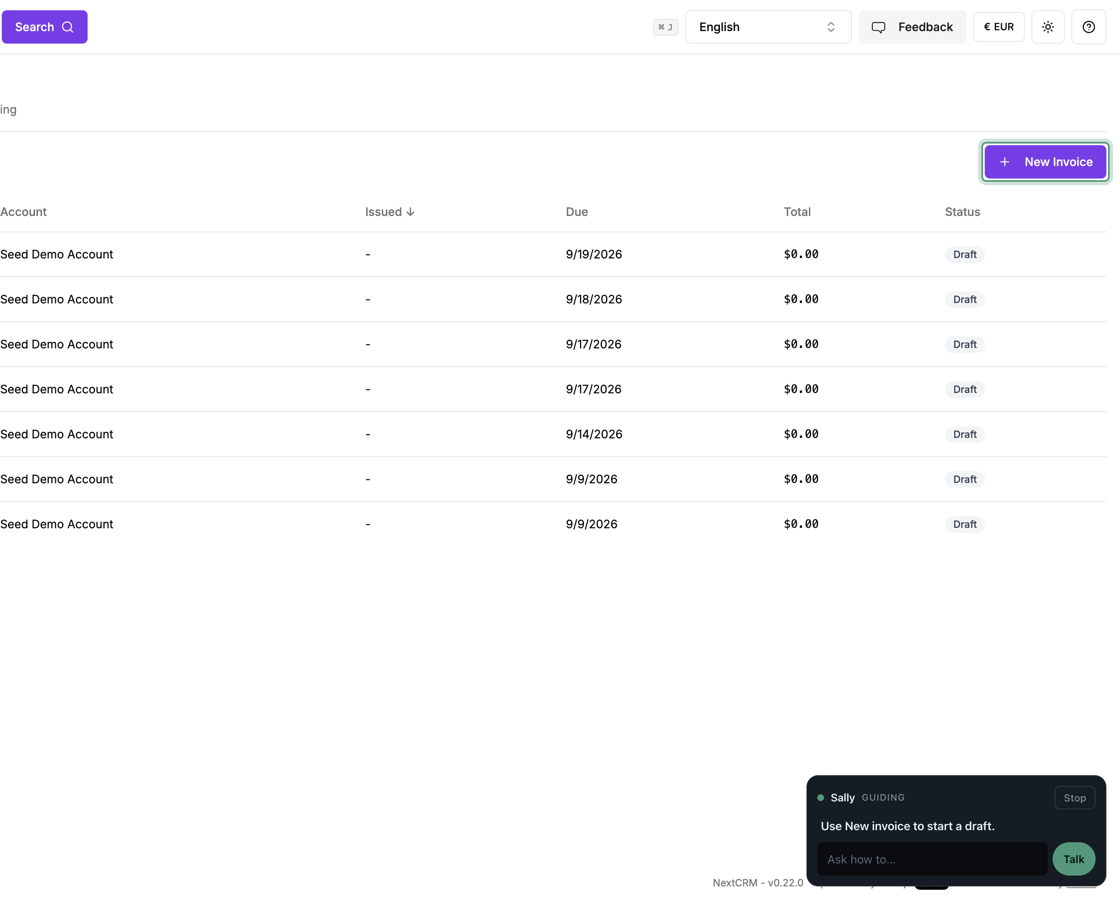 “Help me create an invoice.” She highlights the next step.
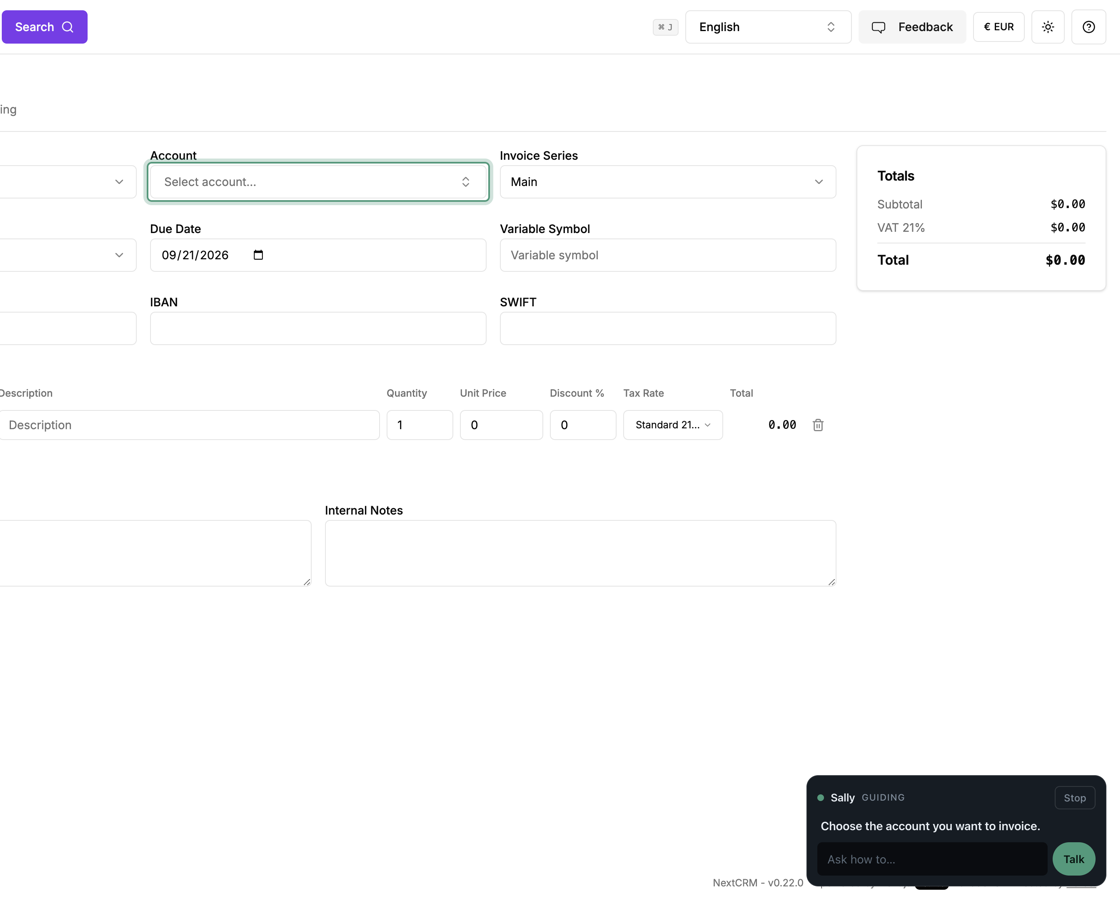 Then walks the form, one field at a time.
A pilot that starts in one session.
Working session
Together we pick 3 to 10 tasks new users struggle with, the ones your team re-teaches most.
Install is one code review
Sally adds those paths to your React or Next.js code as a single change. Your engineers review and approve it.
Start with a small group
Turn Sally on for some of your users first. She only guides by default. You choose where she may click.
Grow from real questions
Questions Sally can’t guide yet show up in a list. Add the ones that matter next.
See it in your own product.
One working session. Your hardest onboarding tasks, guided live in your product.
Book a working session